
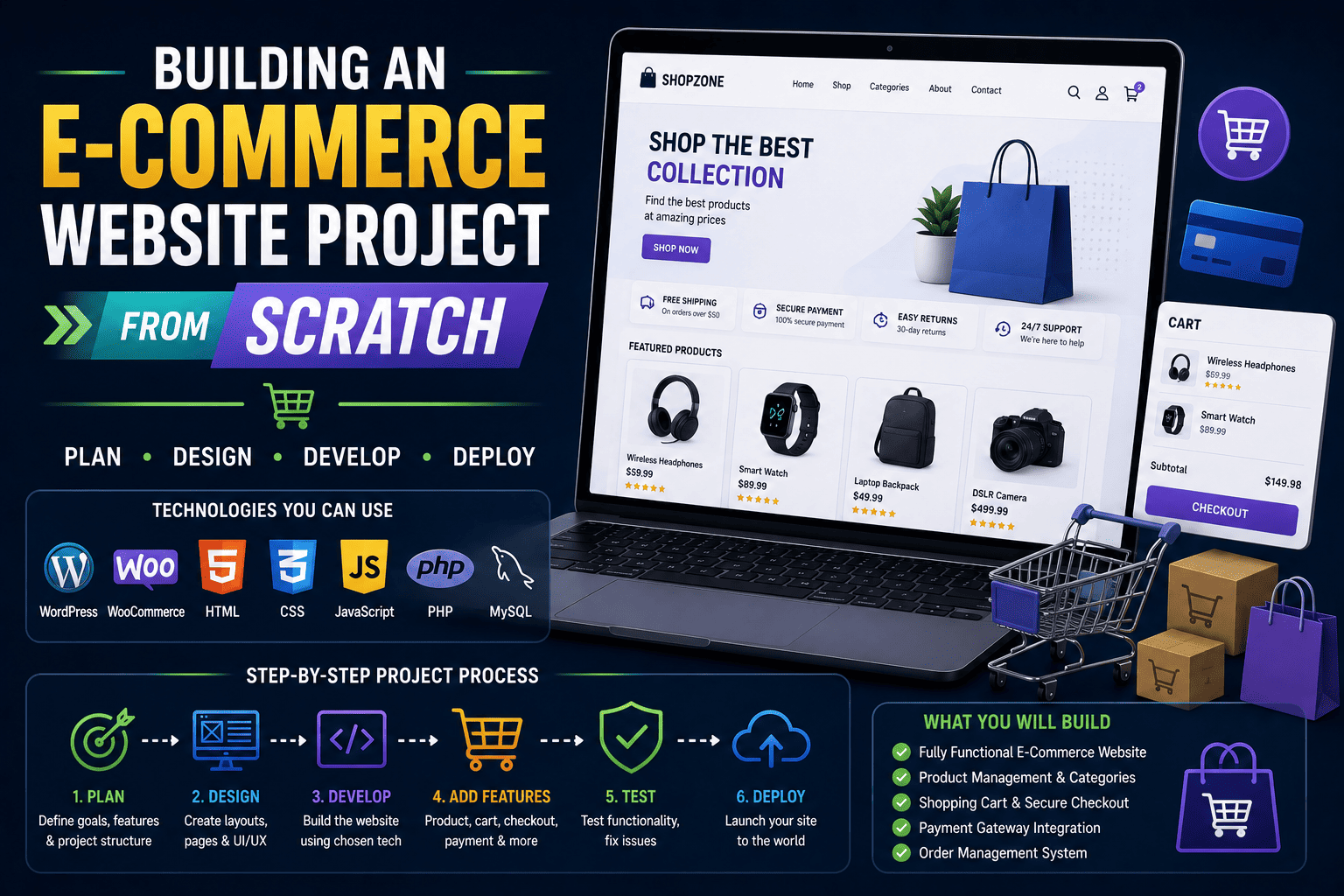
Building an E-Commerce Website Project from Scratch
The Project That Can Transform Your Portfolio
Imagine you walk into an internship interview.
The interviewer asks, “Have you built any real-world projects?”
Many students show simple HTML pages, calculators, or college assignments.
Now imagine showing a fully functional e-commerce website where users can browse products, add items to a cart, place orders, and manage accounts.
Which candidate do you think leaves a stronger impression?
The answer is obvious.
Building an e-commerce website project from scratch is one of the most valuable projects a student can add to their portfolio. It demonstrates technical skills, problem-solving ability, user experience understanding, and business awareness – all qualities recruiters and clients appreciate.
Whether you are a student of 11th or 12th, pursuing BA, BCA, BSc, B.Com, or B.Tech, this project can help you gain practical experience while preparing for future internships, freelance work, or web development careers.
Why an E-Commerce Website Project Is Important
Online shopping has become a part of everyday life.
From ordering clothes and books to purchasing electronics and groceries, businesses increasingly rely on digital storefronts.
As a result, developers who understand how online stores work are in high demand.
An e-commerce project helps you learn:
- Frontend design and user experience
- Website navigation and structure
- Product management
- Shopping cart functionality
- Payment integration concepts
- Mobile responsiveness
- SEO fundamentals
- Website performance optimization
More importantly, it gives you a real project that can be showcased in interviews, internships, and freelance proposals.
What Does an E-Commerce Website Include?
Before starting development, understand the major components of an online store.
| Feature | Purpose |
|---|---|
| Homepage | Introduces products and promotions |
| Product Listing Page | Displays available products |
| Product Detail Page | Shows product information |
| Shopping Cart | Stores selected items |
| Checkout Page | Collects customer details |
| User Account | Allows login and order tracking |
| Contact Page | Customer support and inquiries |
| Admin Dashboard | Product and order management |
A beginner project does not need every advanced feature. Start with the basics and improve gradually.
Step-by-Step Guide: Building an E-Commerce Website Project from Scratch
Step 1: Plan Your Online Store
Many beginners immediately start coding.
Professional developers start with planning.
Ask yourself:
What Will You Sell?
Choose a simple niche such as:
- Books
- Mobile accessories
- Sports equipment
- Fashion products
- Handmade crafts
- College merchandise
For example, a student could build an online bookstore selling academic and competitive exam books.
Define Your Target Audience
Think about:
- Students
- Professionals
- Parents
- Gamers
- Fitness enthusiasts
Understanding users helps create better designs and functionality.
Step 2: Design the Website Structure
Before development, create a basic sitemap.
Essential Pages
- Home
- Shop
- Product Details
- Cart
- Checkout
- About Us
- Contact Us
A simple wireframe on paper can save hours of redesign work later.
Professional developers always sketch layouts before building.
Step 3: Build the Frontend
The frontend is what visitors see.
Technologies You Can Use
Option 1: Coding Approach
- HTML
- CSS
- JavaScript
Option 2: WordPress Approach
- WordPress
- Elementor
- WooCommerce
For beginners, WordPress with WooCommerce provides a faster way to create professional e-commerce websites while still learning real-world website development concepts.
Step 4: Create Product Pages
Every product page should contain:
Product Name
Example:
“Wireless Bluetooth Headphones”
Product Image
Use high-quality images.
Product Description
Include:
- Features
- Benefits
- Specifications
Pricing Information
Clearly display:
- Original price
- Discounted price
- Availability
Call-to-Action Button
Examples:
- Add to Cart
- Buy Now
- View Details
A well-designed product page improves user experience and conversion rates.
Step 5: Implement Shopping Cart Functionality
The shopping cart is the heart of every e-commerce website.
Users should be able to:
- Add products
- Remove products
- Update quantities
- View total cost
Student Example
Suppose a customer selects:
- 2 notebooks
- 1 calculator
The cart automatically calculates the total amount before checkout.
This feature demonstrates practical web development skills and logical programming concepts.
Step 6: Build the Checkout Process
The checkout page collects important customer information.
Common Fields
- Name
- Phone Number
- Address
- Payment Method
For educational projects, you can simulate payment processing rather than integrating real payment gateways.
This helps you focus on functionality and workflow understanding.
Step 7: Make the Website Mobile Friendly
Most users shop using smartphones.
A website that works perfectly on desktop but breaks on mobile provides a poor experience.
Mobile Optimization Checklist
- Responsive layouts
- Readable text
- Fast-loading images
- Easy navigation
- Mobile-friendly buttons
Recruiters often test student projects on mobile devices.
Responsive design immediately makes your project look more professional.
Step 8: Optimize Website Performance
Speed matters.
A slow website frustrates visitors and affects search rankings.
Performance Best Practices
- Compress images
- Minify CSS and JavaScript
- Use caching
- Avoid unnecessary plugins
- Optimize page layouts
Learning performance optimization is an important industry skill because modern websites are expected to load quickly across all devices.
Step 9: Apply SEO Fundamentals
Building a website is only half the job.
People must be able to find it.
Basic SEO Practices
- Write descriptive page titles
- Create meta descriptions
- Use heading tags properly
- Add image alt text
- Create SEO-friendly URLs
- Build internal links
For example:
Poor URL:
website.com/page123
Better URL:
website.com/wireless-headphones
SEO knowledge is valuable because businesses want websites that attract visitors from search engines.
Step 10: Test Everything Before Launch
Professional developers test thoroughly before deployment.
Test Checklist
Functionality Testing
- Add products to cart
- Remove products
- Complete checkout
Responsive Testing
- Desktop
- Tablet
- Mobile
Performance Testing
- Loading speed
- Image optimization
User Experience Testing
- Navigation
- Readability
- Forms
Even small bugs can create a negative impression when presenting projects.
Common Mistakes Students Should Avoid
Building Without Planning: Jumping directly into development often causes confusion later.
Ignoring Mobile Users: Mobile responsiveness is no longer optional.
Using Too Many Plugins: Excessive plugins can slow down websites.
Poor Product Descriptions: Detailed descriptions improve user experience.
Skipping Testing: Unverified projects often contain errors that recruiters quickly notice.
E-Commerce Project: Coding vs WordPress
| Factor | Coding Approach | WordPress + WooCommerce |
|---|---|---|
| Learning Curve | Higher | Lower |
| Development Speed | Slower | Faster |
| Customization | Very High | High |
| Beginner Friendly | Moderate | Excellent |
| Portfolio Value | High | High |
| Industry Relevance | High | High |
Both approaches are valuable.
Beginners often benefit from starting with WordPress and WooCommerce before moving into advanced custom development.
Career Benefits of Building an E-Commerce Website
A complete online store project demonstrates multiple industry-relevant skills.
For Internship Applications: Recruiters can see practical implementation abilities.
For Freelancing: Many small businesses need e-commerce websites.
For Portfolio Building: The project becomes strong evidence of your capabilities.
For Entrepreneurship: You can launch your own online business.
For Advanced Learning: It creates a foundation for:
- WooCommerce development
- Payment integration
- Membership websites
- Marketplace platforms
E-commerce development is recognized as an important progression path in modern website development training.
How SiteGenius Helps Students Build Real Projects
Many students spend months watching tutorials but never complete a real project.
The difference between learning and becoming job-ready is practical implementation.
The SiteGenius Web Development Training Program focuses on project-based learning where students develop real websites, learn website structure, responsive design, SEO, performance optimization, and professional project presentation skills. Students work on hands-on projects and gain experience that can be showcased in portfolios, interviews, and freelance opportunities.
You can:
- Explore the curriculum page to see skill modules
- Visit the admission page for batch details
- Attend the free Awareness session
FAQs- Building an E-Commerce Website Project from Scratch
Is an e-commerce website a good project for beginners?
Yes. It combines design, development, user experience, and business concepts into one practical project, making it an excellent learning experience.
Can I build an e-commerce website without coding?
Yes. Using WordPress, Elementor, and WooCommerce, beginners can create professional online stores while learning web development fundamentals.
How long does it take to build a basic e-commerce website?
A beginner can complete a basic project in a few weeks, depending on learning pace and project complexity.
Will this project help me get internships?
Absolutely. Recruiters value practical projects because they demonstrate real-world skills rather than theoretical knowledge alone.
What should I include when presenting my e-commerce project?
Explain:
- Project objective
- Technologies used
- Features implemented
- Challenges faced
- Solutions created
- Future improvements
Conclusion
Building an e-commerce website project from scratch is much more than a college assignment.
It is an opportunity to learn real-world web development, strengthen your portfolio, understand business requirements, and gain confidence in creating complete digital solutions.
Every professional developer starts with a first meaningful project.
Your e-commerce website could be that project.
Start small, focus on learning, improve continuously, and treat every challenge as a stepping stone toward becoming a skilled web developer.
The sooner you begin building real projects, the faster you move from being a learner to becoming a creator.